22 of November of 2024
Data Studio Pro Pricing: Is It Worth It?

Isaac Correa
Looker Studio Templates
Pricing & Product Comparisons
What you really get when you pay for Looker Studio Pro—and whether it’s worth it.
Google publishes one number for Data Studio Pro: $9 per user per project per month. The word that decides your bill is not the $9, it is project. A Pro subscription links to one Google Cloud project, so the same three people working across five projects hold fifteen licenses between them.
So, is it worth it? The short answer, and the rest of this page is the evidence for it: Pro is worth paying for when your reports have to outlive the people who built them, and it is a poor deal for almost every other reason. It buys ownership and administration. The report itself comes out the same. Everything below was checked against Google's own documentation on September 11, 2026.
First, a naming note, because it changes what you should be searching for. Google's documentation now opens every page with one line: "Looker Studio is now called Data Studio." That banner appears on all six pages cited at the foot of this article, and the product page itself no longer contains the words "Looker Studio" at all. Same product, same free tier, same Pro. If you arrived here searching for Looker Studio Pro pricing, this is the page you wanted.
Key takeaways
- The published price is $9 per user per project per month. Google states it on its Data Studio product page, and adds that the per-user price "varies depending on the length of the customer's subscription".
- A subscription links to a single Google Cloud project. To cover a second project you create a second subscription. That is what multiplies the bill, and it is the part a price tag cannot show you.
- Licenses are billed whether they are used or not. In Google's words, you are billed "regardless of whether or not those licenses are used".
- Support is not included in the $9. Pro makes Cloud Customer Care available; you still need a separate Google Cloud support plan to use it.
- Looker customers get at least 1,000 Pro licenses at no cost, subject to dates and instance types. Google words this as licenses available "as part of a Data Studio Pro subscription", so confirm with your account team whether it removes the bill or only the per-seat part of it.
- The AI is two Preview features, and free only for now. Gemini in Data Studio writes calculated fields and exports charts to Slides. Google says it is free during Preview and "may require an additional fee" afterwards.
- The free tier is still free. Google calls it "our self-service tier" and prices it at "No charge".
What Data Studio Pro costs, in Google's own words
Google publishes the price on its own product page, in a two-row table, and the wording matters more than the number.
Data Studio. Self-service data visualizations and reports. No charge.
And the paid row, in full:
Data Studio Pro (Project subscription). Department level reports and visualizations with Google Cloud support and system administration. [...] Comprehensive support for advanced security controls, including Customer-Managed Encryption Keys (CMEK) for all assets developed within Data Studio. $9 per user per project per month.
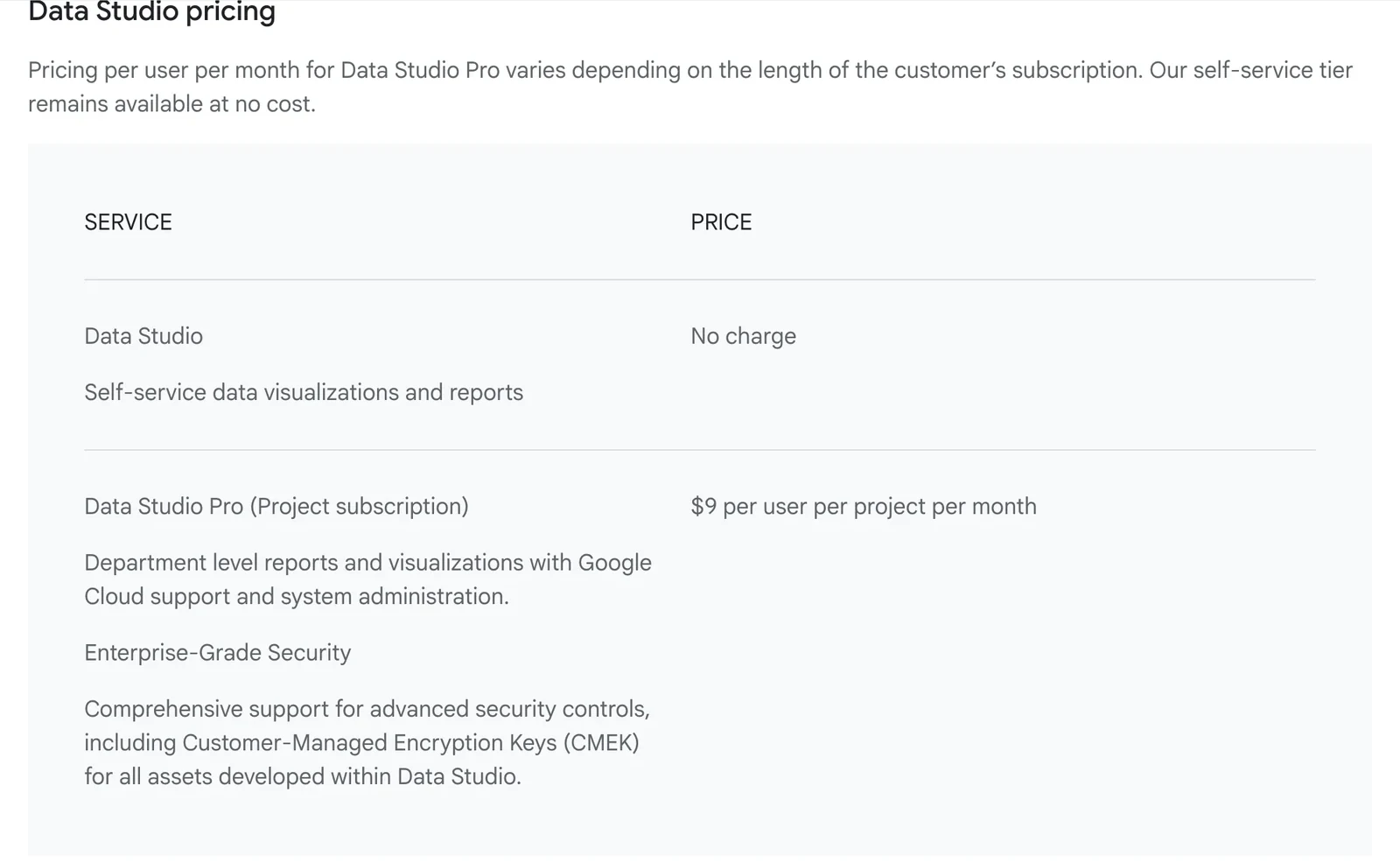
Two things in that table get skipped. The first is the label Google gives the paid row: Project subscription. The second is the sentence directly above it: "Pricing per user per month for Data Studio Pro varies depending on the length of the customer's subscription."
So $9 is a published rate that moves with contract length, and Google keeps that ladder to itself. Treat it as the number your conversation starts at. Your invoice will say something else.
How the per-project rule multiplies the price
A Google Cloud project is an administrative container, and Pro is tied to exactly one of them.
Google states the rule plainly on the page about linking Pro to projects:
A Data Studio Pro subscription can link to a single Google Cloud project. To link Data Studio Pro to multiple projects within your organization, create a new subscription and link to each project separately.
One subscription covers one project. A second project needs a second subscription, with its own licenses for the same people, so the multiplier is projects times builders.
Google licenses builders. The people who only read reports come in for nothing:
Each Data Studio Pro user in the subscription who needs to create, edit, or manage content within Pro workspaces requires one Pro license. [...] Users who only need to view reports that are created within a Data Studio Pro environment don't require a Pro license. They only need the appropriate sharing permissions for the specific reports or data sources.
That is the first number most companies get wrong, and they get it wrong upwards. An agency with three analysts and forty client contacts licenses three people. The forty open a link. What those viewers give up, in Google's words, is that they "don't have access to Pro-specific features like team workspaces or enhanced content management".
So the table below multiplies three builders. Count yours before you read it: the number that matters is how many people open the editor, not how many read the output.

The same figures, to check against your own project count. This table is our arithmetic on Google's published $9 rate and Google's one-subscription-per-project rule. Google does not publish it.
| Projects | Licenses | Per month | Per year |
|---|---|---|---|
| 1 | 3 | $27 | $324 |
| 3 | 9 | $81 | $972 |
| 5 | 15 | $135 | $1,620 |
| 10 | 30 | $270 | $3,240 |
| 20 | 60 | $540 | $6,480 |
Nothing about the team changes down that column. The last row costs twenty times the first, and the only thing that grew is the number of containers the work is filed under.
This is the structure that catches agencies and consultancies hardest, because separating clients into separate Google Cloud projects is the correct thing to do for access control and billing hygiene. Do the tidy thing and the license count multiplies by the number of clients.
Google states the double charge itself, in a note at the foot of that same page about linking projects:
If a user is in multiple Google Groups in a subscription, you will be charged for a license only once for that user. However, if an individual user belongs to multiple subscriptions, you will be charged for a license for each subscription that user is in.
One person in five subscriptions is five licenses, stated by Google, in a footnote at the bottom of that page.
Two things the table still cannot settle, and both move the number. Count only the people who create, edit or manage, because that is the line Google draws and most budgets are built on headcount instead. And expect a different rate at volume: Google says the per-user price "varies depending on the length of the customer's subscription" and does not publish the ladder, so sixty seats will not quote at sixty times nine.
Three costs the price tag does not include
The $9 buys the product. It does not buy three things most people assume come with a paid tier.
Unused seats still bill. Licenses are assigned to people, and Google is explicit about what happens if nobody uses them:
You'll be billed monthly for the number of Pro licenses in the subscription, regardless of whether or not those licenses are used.
That is normal for seat licensing and it is worth saying out loud, because the per-project structure makes it easy to accumulate seats nobody touches. A project that went quiet six months ago is still billing for everyone who was ever assigned to it.
Support is sold separately. This is the one that surprises people, because "Google Cloud support" appears in Google's own description of the paid row. What Pro actually does is make Cloud Customer Care available to you, not include it. Google's note:
Data Studio support is not included in other premium Google Cloud services. To receive technical support for Data Studio Pro issues, you'll need both a Google Cloud support plan and a Data Studio Pro subscription.
Google's support page removes the ambiguity in one sentence: "A Standard Support plan is required to open support cases for Data Studio Pro." Pro is the ticket that makes you eligible. The support plan is a second purchase.
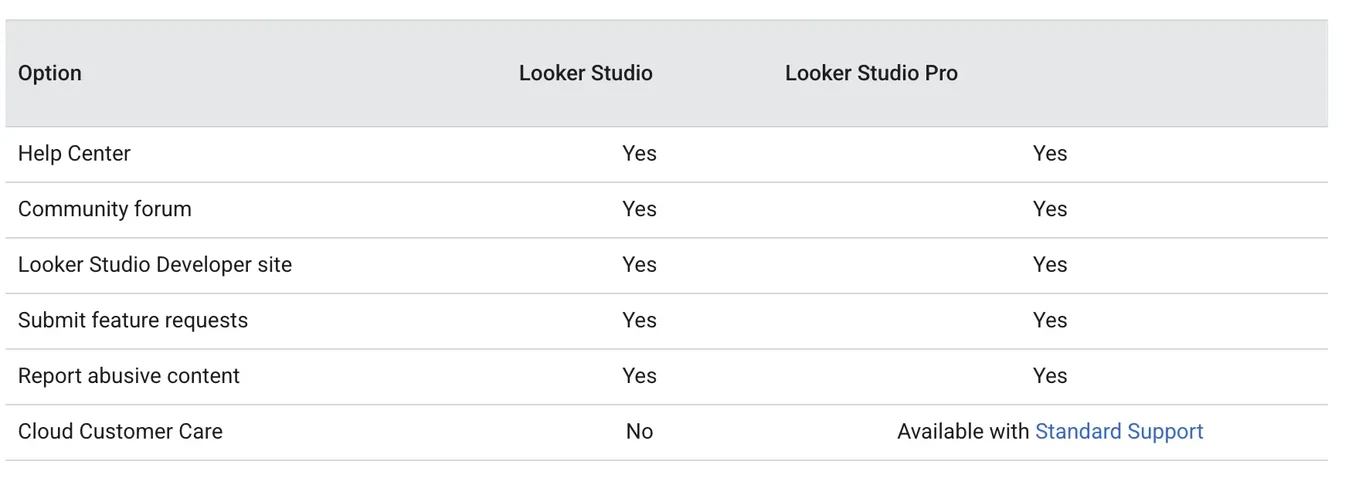
If your reason for upgrading is "so we can call someone when it breaks", price the Google Cloud support plan first. That is the line item that actually delivers the phone call, and it is not $9.
The AI features are free for now, and Google says so in the conditional. Gemini in Data Studio is the only part of Pro that is a reporting feature rather than an administrative one, and the two documentation pages that describe it both open with the same warning, in slightly different words:
Gemini in Data Studio Preview features are available at no additional cost for a limited time only. At the end of this Preview period, you may be required to purchase Gemini in Data Studio features for an additional fee.

So the AI is not priced yet. If it is the reason you are upgrading, you are budgeting for a line item Google has not published. What it does today, and what it does not, has its own section below.
Looker customers get at least 1,000 Pro licenses free
If your company already runs Looker, the licenses may already be yours.
The subscription documentation carries a license grant that the price tag does not mention:
As part of a Data Studio Pro subscription, a number of Data Studio Pro licenses are available at no cost to users of a Looker instance. Eligible Looker customers receive at least 1,000 complimentary licenses, or more if their Looker license count exceeds 1,000.
Read the wording closely before you celebrate: Google says the licenses come "as part of a Data Studio Pro subscription", which is not the same as saying the subscription itself is free. Confirm that with your account team rather than with us. Then check the exclusions. There are three, and only two of them turn on a date. Out: Looker (original) instances affiliated with contracts signed after August 1, 2026, and Looker (Google Cloud core) instances created after August 1, 2026. Out regardless of date: customer-hosted Looker (original) instances.
The practical version: if your organization bought Looker before August 2026 and does not host it itself, check with whoever owns that contract before you buy a single Pro license. A thousand free licenses is a different conversation from $9 a head.
What the money actually buys
Everything you use to build a report already lives in the free tier. What Pro adds sits around the report: seven things, of which six are about ownership, access, delivery and compliance, and one is the AI still in Preview.
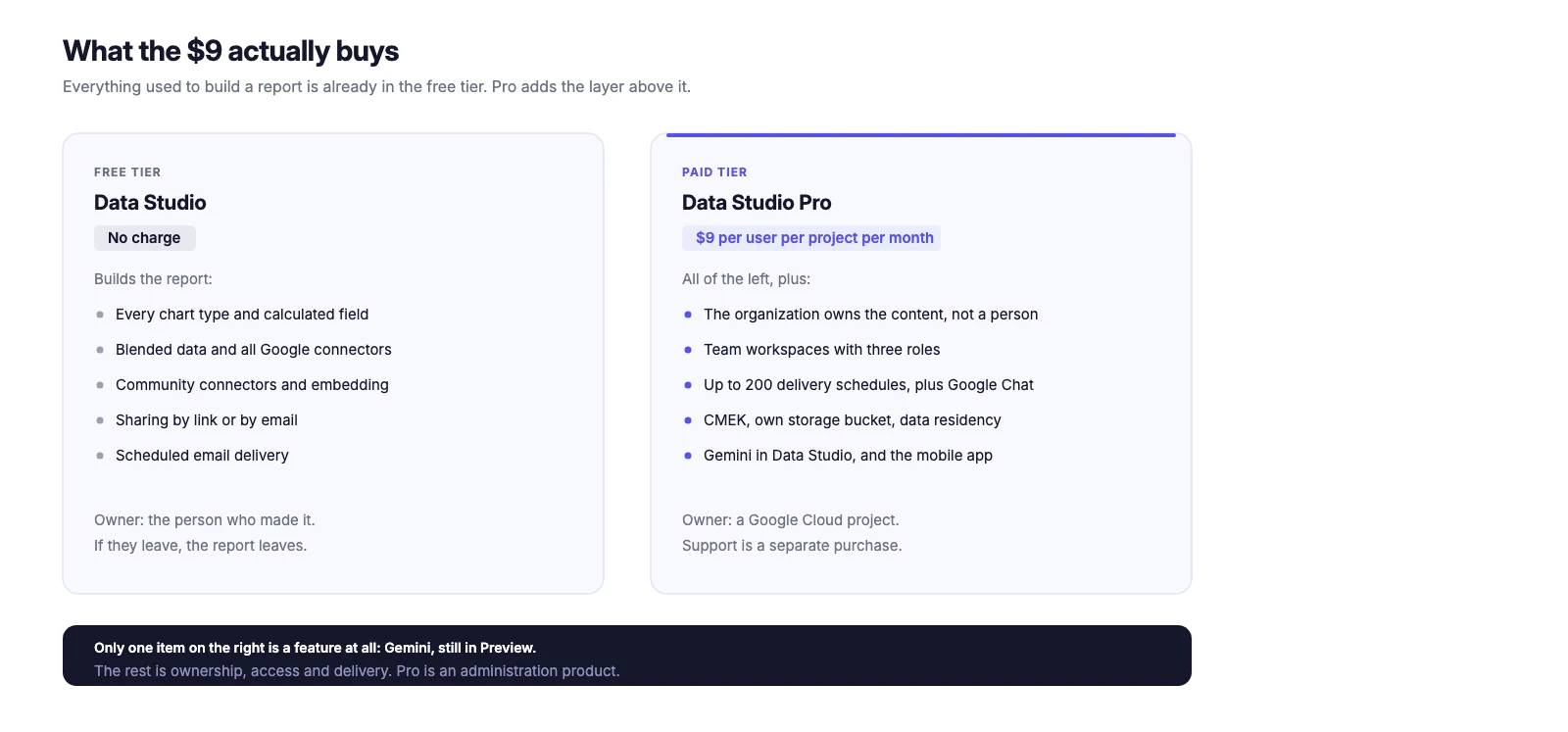
Google's own list, condensed, with the part that matters to each:
Content belongs to the organization, not the person. In the free tier, a report is owned by the Google account that made it. When that person leaves, their reports leave with them. Pro links content to a Google Cloud project so that, in Google's words, "your critical assets will continue to work even if the person who created them leaves the organization", and administrators can set project-level permissions with IAM.
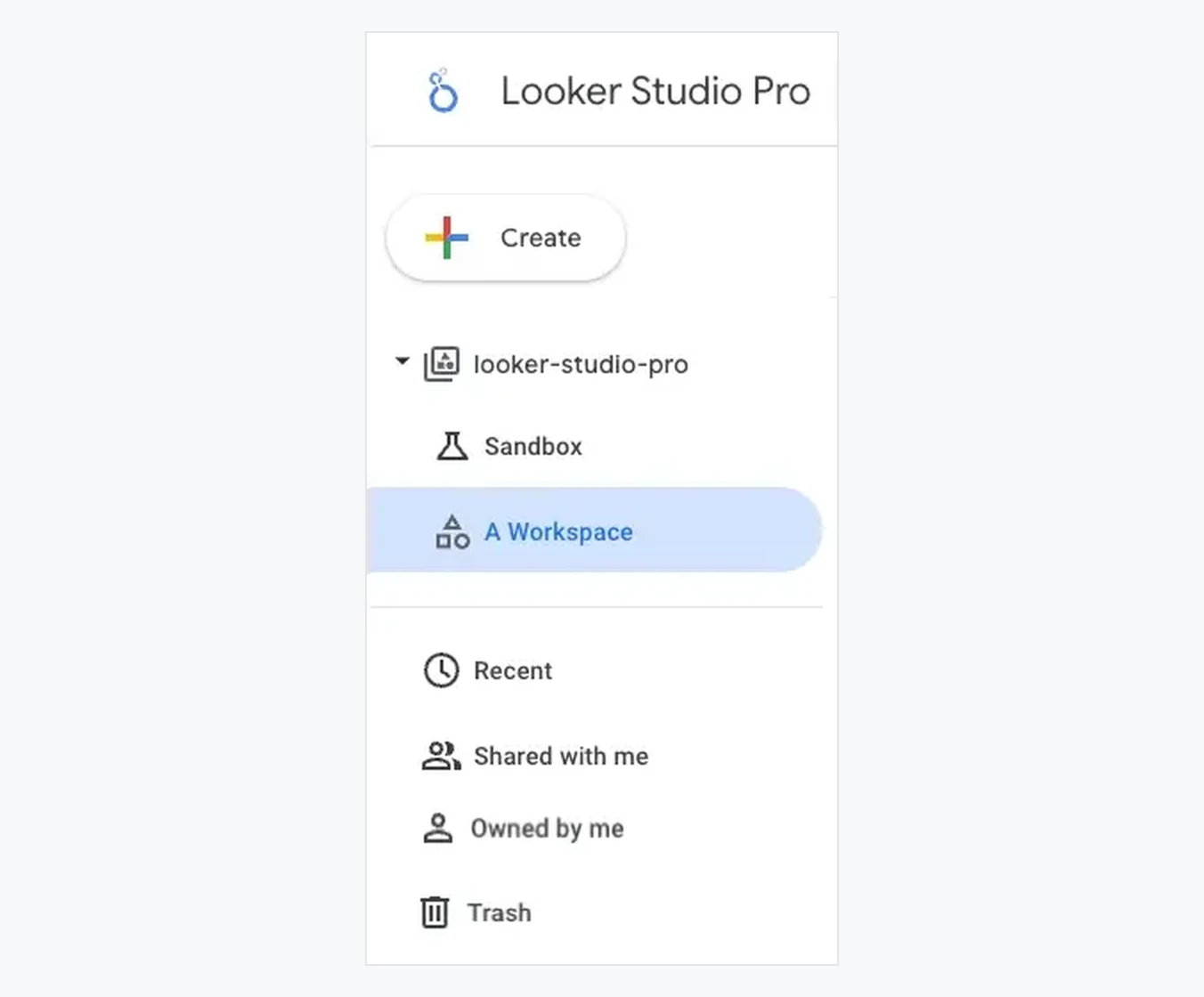
Team workspaces. Shared locations where membership grants access, with three roles: Manager, Content Manager and Contributor. In the free tier, access is per file and per person, which is where the sprawl comes from.
Delivery at scale. Up to 200 delivery schedules on a single report, delivery to Google Chat, and alerts that fire when a chart meets a condition you set. The free tier schedules email, and far fewer of them.
Personal report links. A link that hands the recipient their own copy to edit and explore without touching your original.
Security and compliance controls. Customer-managed encryption keys, storing uploads in your own Cloud Storage bucket and extracts in your own BigQuery dataset, and data residency within a geographical area.
Gemini in Data Studio. Two assistance features, both in Preview: writing calculated fields from a description in plain English, and pushing report charts into a Slides deck with a generated summary under each one. Pro-only, and covered in full in the next section.
The Looker mobile app, for reading reports away from a desk.
Read that list back and a pattern shows up. Alerts and personal report links aside, and setting Gemini apart for a moment, none of it adds a chart type, a connector or a calculated field. It changes who owns the report, who can reach it, and what survives when the person who built it leaves. Pro is an administration product sold next to a reporting product.
What Gemini in Data Studio actually does, and what it does not
This is the part of Pro most likely to be oversold, so here it is against Google's own page.
Gemini in Data Studio is two features, and Google labels both of them Preview:
- Calculated fields from a description. In the data source editor, "Add a field" now has a "Help me write" icon. You describe the field you want and Gemini proposes a formula built from your own fields and Data Studio's functions.
- Report charts into Slides. From the Gemini panel of a report, "Generate Slides" imports your visualizations into a presentation as images, writes a text summary of each one, and inserts it underneath. You can also push updates into a deck that already exists.
That is the list. Two features, both in Preview, both requiring an editor role on the report.
It is off until someone turns it on. A Pro subscription does not switch Gemini on by itself. Somebody holding the lookerstudio.pro.manage IAM permission, which comes with the Data Studio Pro Manager or Owner roles, has to enable it for the project. Budget for that conversation with whoever administers your Google Cloud project, because without it the feature you paid toward is invisible.
Pro does not gate the famous one. "Chat with your data", the feature most people picture when they read "AI in Looker Studio", is Conversational Analytics, and Google is explicit that it sits outside this:
Conversational Analytics is a chat with your data feature powered by Gemini for Google Cloud that doesn't require Gemini in Data Studio to be enabled.
What a Pro subscription with Gemini enabled does add inside that chat is the Code Interpreter, which turns a question into Python and runs it, so the analysis can go past what a SQL query would return. Google's condition, verbatim:
Use of the Code Interpreter requires that Gemini in Data Studio is enabled for a Data Studio Pro subscription.
Put the three facts together and the honest summary is narrow. Pro's AI today is a formula helper, a Slides exporter, and the Python tier of a chat feature that otherwise works without it. It is real, it is useful if you write a lot of calculated fields, and it is priced at nothing until Google decides otherwise. Upgrading for it alone means paying $9 per user per project for a Preview.
Looker Studio is free, and the free tier is staying
Google words it as a commitment: "Our self-service tier remains available at no cost."
On the free tier you still get every chart type, every calculated field, blended data, all the Google connectors, community connectors, report embedding, and sharing by link or by email. You can schedule email delivery, just not two hundred schedules of it. The finished dashboard a Pro customer looks at can be built here, chart for chart; what changes is who helped write the formulas and who owns the file afterwards.
Two things you do not get: the Gemini assistance described above, and an owner other than yourself. The second one is why the decision is rarely about features.
What happens to your reports if you cancel
The whole case for Pro is that content belongs to the project instead of to a person. So the fair question is what happens to that content when the payments stop, and Google answers it in the first paragraph of its cancellation page:
Before you cancel a Data Studio Pro subscription, we highly recommend that you have a plan for moving your Pro content out of team workspaces.
Read that as what it is. The ownership you are buying is ownership inside Pro. Cancel, and the content has to come out of the team workspaces it was living in, which is a migration you have to plan rather than a switch that flips back.
There is a sharper detail on the same page, and it is the exact scenario Pro is sold to prevent:
If the original project owner has left the organization, assign another user the Owner or Looker Studio Pro Manager role on the project to manage or cancel the subscription. [...] Without one of these roles, the option to cancel the subscription isn't visible.
That quote still says "Looker Studio Pro Manager" because the rename has not reached every page. The IAM role you want is the same one.
The product you buy so that reports survive the person who built them can, if that person was also the project owner and nobody reassigned the role, leave you unable to see the cancel button. It is fixable in IAM in ten minutes. It is worth knowing before it is urgent, not after.
Who should upgrade, and who should not
Upgrade when the reports outlive the people. If a report going dark because someone left would stop a department, you are buying continuity rather than features, and $9 a head on one project is cheap insurance. This is the strongest case for Pro and it applies to most companies past a certain size.
Upgrade if you already run Looker. Check the complimentary licenses before anything else.
Upgrade if compliance requires it. CMEK, customer-managed storage and data residency are not obtainable any other way, and if your security team has asked for them the decision has already been made elsewhere.
Think hard if you are an agency with many client projects. The per-project multiplier is working against you specifically, and the tidier your Google Cloud hygiene the worse it gets. Before subscribing, count your projects, multiply, and compare that against consolidating reporting into fewer projects with tighter sharing.
Stay free if you are one person, or a small team on one project, building reports for yourself or for clients who receive a link. Nothing in the Pro list solves a problem you have. The ownership question only becomes a question when the owner might leave.
Stay free if what you actually want is a better report. Pro leaves the dashboard exactly as it was. Keep that decision away from the licensing one: a paid tier is an expensive way to fix a layout.
What this guide does not settle
Three boundaries, so you know what you are holding.
The $9 is a rate, not your invoice. Google says on the same page that the per-user price "varies depending on the length of the customer's subscription", and it does not publish that ladder. A longer commitment may pay less than $9.
The multiplication table is ours. Google publishes the $9 and publishes the one-project-per-subscription rule; the combination is ours. We have not run a multi-project subscription, so verify against Google Cloud billing before you budget from it.
This covers the self-service subscription. There is a second type, the organization-wide MAU subscription, where billing is based on monthly active users instead of licenses. Google says it is "available only for large organizations" and requires a Google Cloud sales specialist. If that is you, none of the arithmetic above applies to your case and the price is whatever sales quotes.
Frequently asked questions
How much does Data Studio Pro cost? $9 per user per project per month, as published on Google's Data Studio product page. Google adds that the per-user price varies with the length of the subscription, so that figure is the published rate rather than a fixed quote.
Is Looker Studio Pro the same as Data Studio Pro? Yes. Google renamed Looker Studio to Data Studio, and each page cited at the foot of this article opens with the line "Looker Studio is now called Data Studio." The product, the free tier and the Pro subscription are unchanged. We use "Looker Studio" in places here because that is still what people search for.
Is Looker Studio free? Is Data Studio free? Yes, and they are the same question. Google prices the self-service tier at "No charge" and states that it "remains available at no cost". Every chart type, connector, blend and sharing option stays in the free tier, with no row limit on reports and no expiry. The only paid tier is Pro, and what it sells is ownership and administration rather than reporting features.
Does Pro include support? No, not on its own. Pro makes Cloud Customer Care available to you, but Google states you need both a Google Cloud support plan and a Pro subscription to receive technical support.
Do I pay for licenses nobody uses? Yes. Google bills monthly for the number of licenses in the subscription regardless of whether they are used.
Can I try Data Studio Pro before paying? Yes. Google offers a 30-day trial with no limit on the number of users, and says billing begins automatically afterwards unless you cancel during the trial.
Do Looker customers pay for Data Studio Pro? Often not. Eligible Looker customers receive at least 1,000 complimentary Pro licenses. The exclusions are date-based and instance-based, so check your contract before buying.
Does Data Studio Pro include AI? It includes Gemini in Data Studio, which is two Preview features: generating calculated fields from a plain-English description, and exporting report charts into Slides with a written summary of each. An administrator has to enable it for the project. Google's documentation says these features are free during Preview and may require an additional fee afterwards. Conversational Analytics, the chat-with-your-data feature, does not require Gemini in Data Studio to be enabled, though its Python Code Interpreter does.
Is Looker Studio Pro worth it? It is worth it when your reports have to outlive the people who built them, and rarely for any other reason. Pro does not add chart types, connectors or calculated fields; those are all in the free tier. What it adds is that content belongs to a Google Cloud project instead of to a personal Google account, plus team workspaces, 200 delivery schedules, CMEK and data residency. If a report going dark because someone left would stop a department, $9 per user per project is cheap. If you want better-looking reports, it changes nothing.
What is the difference between Data Studio Pro and Looker? They are different products. Looker is Google's enterprise BI platform with a modeling layer. Data Studio Pro is the paid tier of Data Studio, which is the reporting and dashboard tool.
If what you want is a better report, not a license
A large share of the traffic to any Pro pricing page is not there for governance. It is there because the reporting is slow to build and hard to read, and Pro looks like the button that fixes that.
It is not. Everything that makes a report good is in the free tier, which is where all six of our dashboards run.
The Google Search Console Dashboard and the All-in-One Web, SEO and Ads Dashboard connect to your own properties on the free tier, Pro subscription or not, and so do the other four. If you want to test that before spending anything, point one at the Google Analytics demo account and look at the finished report on Google's own data. That costs nothing and it settles the question faster than any pricing article, including this one.
Buyers in 27 countries have left 103 reviews of those templates, at 4.97 out of 5.
Then decide on Pro for what Pro actually is: an ownership and administration layer, priced per user, per project.
Sources
Every price, quote, rule and limit above comes from one of these seven pages of Google's own documentation, each opened and checked on September 11, 2026. Google redirects its older Looker Studio URLs to these, which is why they read data-studio. What does not come from them is flagged as ours in the text: the multiplication table, and the reading of what the Looker license grant covers.
- Data Studio product page, Google Cloud. The pricing table, the "$9 per user per project per month" figure, the "No charge" free tier, and the note that the per-user price varies with subscription length.
- About Data Studio Pro, Google Cloud Documentation. The feature list, the 30-day trial, and the renaming banner.
- Data Studio Pro subscription overview, Google Cloud Documentation. Billing for licenses regardless of use, the viewer exemption, the complimentary Looker licenses and their exclusions, and the MAU subscription type.
- Link Data Studio Pro to different projects, Google Cloud Documentation. One subscription links to one Google Cloud project, and the rule on users in several subscriptions.
- Contact Data Studio support, Google Cloud Documentation. That a Standard Support plan is required to open support cases for Pro.
- Gemini in Data Studio overview, Google Cloud Documentation. The two Preview features, the pricing note for after Preview, the enablement permission, and the boundary with Conversational Analytics.
- Cancel a Data Studio Pro subscription, Google Cloud Documentation. Moving content out of team workspaces before cancelling, and what happens when the project owner has left.
The multiplication table is our arithmetic on Google's published rate and Google's one-project rule, not a figure Google publishes.