Google Ads Dashboard for Data Studio





4.98 from 103 reviews in 27 countries: read them
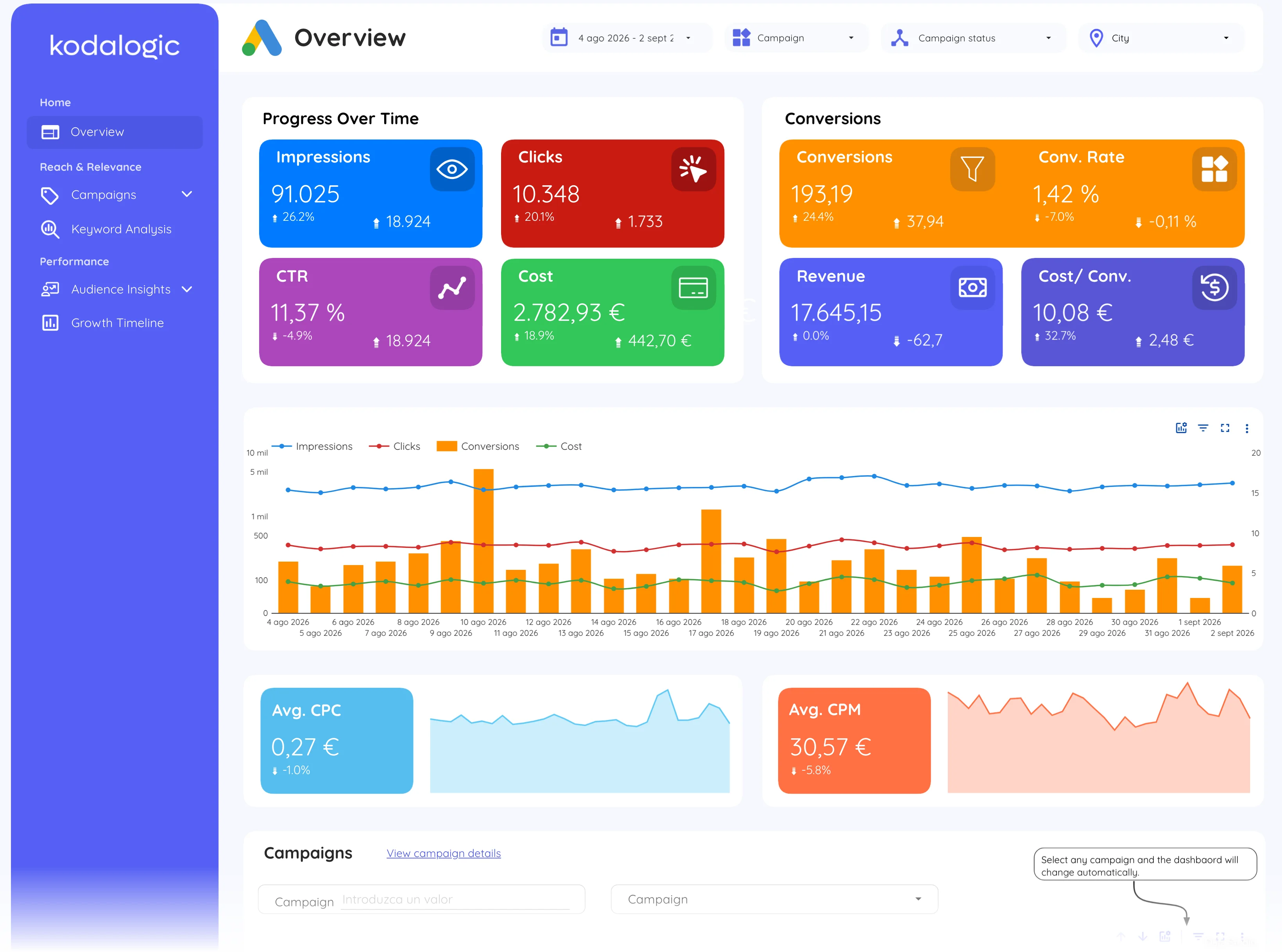
Overview · Page 1 of 8
See it in motion
14 seconds of the live report, page by page.
What this PPC report template shows, page by page
8 pages in the report. The 8 in the gallery above are the ones you will use weekly, each with what it answers and its page open in the live demo.
Eight pages, connected free, through Google’s own native connector.
Spend and results, first, structured around how a spend review actually starts.
Campaign type, match type, keyword, the three cuts a PPC decision needs.
Up to 50 sub-accounts under an MCC, white label, no monthly export cycle.
The long version
This Google Ads dashboard for Looker Studio is the PPC report that runs itself: eight pages connected through Google’s free native connector, with your campaign data flowing in automatically. ROAS arrives already calculated as conversion value over cost, cost per conversion beside it, and every number updates continuously, so the report reflects the account right now, not the state of a spreadsheet from last Friday.
It is structured around how PPC decisions actually get made, not around listing every metric Google Ads exposes. The headline numbers answer “what did we spend and what did we get back” in seconds; the campaign pages compare Search against Display with cost and conversions side by side; the keyword page splits phrase, exact and broad match so the “broad match is eating the budget” conversation happens with numbers on the table; and the audience pages show which ages, genders and locations convert, not just which ones click.
What clients say about working with kodalogic
4.97 out of 5 across 103 verified reviews. Around 400 dashboards built since 2022, for clients in 50+ countries. The same team builds every template. Read all of them · verify them on Fiverr.
- 5 stars
- 102
- 4 stars
- 1
- 3 stars
- 0
- 2 stars
- 0
- 1 star
- 0
He was very knowledgeable with Data Studio/Looker and helped me so much. When it was time to make changes, he was very responsive and accommodating. He is a happy and hard-working person and I can tell that he enjoys his work and helping his clients very much. I would say he went above and beyond in terms of being responsive and accommodating to all of the requested edits. I will definitely use him again and highly recommend him to anyone who needs expertise with reporting dashboards.

I recently worked with Kodalogic on a Google Looker Studio Dashboard, and the experience was fantastic. He designed an impressive dashboard and skillfully fixed errors in an older one. His communication was clear, and his expertise was evident throughout the project. I'm absolutely satisfied with his work and will definitely be collaborating with him again. Highly recommended!

I had a great experience with him. He helped me make a report using Google Looker Studio, with data from Facebook Ads and Google Ads. He knew a lot about these and made a really good report. I asked for many changes, and he did all of them without any problems. He was very patient and made sure I was happy with everything. I'm 100% satisfied with his work. He's the best!

What you get with every template
Everything below comes with the one-time price, and the three steps under it are all it takes to have the report running on your data.
- Full edit access from day one
- Your logo, colors and theme
- Unlimited copies and accounts
- Share and schedule deliveries
- Export chart data to Sheets
- Setup guide and support included
Set up in three steps
No connectors to install and no extra accounts. You copy the report into your own Data Studio and point it at your property.
- Step 1
Open your template
After checkout you get the link straight away, with the setup guide next to it.
- Step 2
Connect your account
Copy the report and pick your own property when Data Studio asks for the data source.
- Step 3
Your data is in
Every page fills with your numbers. Rename it, drop in your logo, share the link.
What this dashboard measures
14 metrics and 16 dimensions across all 8 pages of the report, each one explained.
Read from the live demo. Dotted links open the glossary definition; solid links open the field reference. Page numbers are the report's own.
- Page 01Overview
- Page 02Campaigns
- Page 03Search campaigns
- Page 04Display campaigns
- Page 05Keyword analysis
- Page 06Audience: location
- Page 07Audience: demographic
- Page 08Growth timeline
Before you buy
Questions people ask first
Because a free template is a layout, not a report. This one ships eight finished pages, each built around a question a client actually asks, with the metrics already chosen and named, and Smart Interpretations writing the reading of the data in plain language. A free gallery template gives you charts and leaves the thinking to you, every month.
Yes. Google renamed Looker Studio to Data Studio in 2026; the product, the connectors and the reports are the same. Every template here is a Data Studio template and works in the free version, whichever name your account shows.
Three steps, about ten minutes. Open the template link and make a copy into your own Data Studio account; connect each data source to your property, account or site with Google’s native connector; then share the copy by link or schedule its delivery. The setup guide that comes with every purchase walks each step with screenshots.
Yes. The demo is the same report, running on demo data. When you connect your own property the layout, pages and charts stay as you saw them: the numbers become yours.
You get the template link plus written setup instructions that walk you through connecting your own data and customising the report.
Write to us. Technical support to resolve issues is part of what you buy, not an add-on.
Yes. Copy it, brand it and use it across the clients you manage. What you cannot do is resell the template itself as a product.
No. One payment, and the template is yours.
Before you buy
- Is 8 pages enough to run Google Ads reporting?
It covers the questions that get asked weekly: Overview, Campaigns, Keyword analysis and Audience insights, with spend, ROAS, CPA and conversions already calculated. All 14 metrics and 16 dimensions are explained in a built-in glossary on the page where each one appears, so the report can be sent to whoever signs off the budget.
- How long does it take to have it running with my data?
You copy the report into your own account and point it at your Google Ads account: the calculated fields, date controls and filters are already in place, so nothing has to be rebuilt. There is a live demo you can open before you buy to see exactly what you are getting.
Other dashboards
Three of the six. Compare all six side by side.
Read the deep dive
We have written these features up in full: what they do, why they matter and how to use them once the report is connected.
- Track ROAS and conversions without the spreadsheetWhich PPC metrics belong on a dashboard and which ones are vanity, with the ROAS and CPA benchmarks by industry to judge yours against.
- The PPC report that runs itselfThe dashboard structure behind this template: four headline numbers, the spend-versus-conversions trend, the campaign table and one priority flag.
- A PPC dashboard, page by pageWhat each page of this report answers, from campaign comparison to match types and audience segments.
Take Google Ads Dashboard for Data Studio home.
One-time payment · lifetime updates · prices in USD · no taxes charged. See it running with real data before you pay.
$129
- probar
Open the full report with real data before you pay: every page, no account, nothing to imagine.
- entrega
Your link lands in your inbox right after payment. You copy the report into your own Google account.
- licencia
Unlimited copies and client accounts: one purchase covers every client you report for.
- factura
Automatic invoice with your company and tax number, issued the moment you pay. Prices in USD, nothing added at checkout.
Sold by Kodalogic, Avenida de Leonardo Da Vinci 8, Getafe (Madrid), Spain. Company details